The notes below formed the basis of a presentation I did at a conference a. few years ago. Take from it whatever you find most relevant to your. situatiion.
The notes below formed the basis of a presentation I did at a conference a few years ago. Take from it whatever you find most relevant to your situatiion.
In this article…
What we can learn from agriculture: farmer's footing
How do farmers stay in business? Apart from the standard financial stuff like keeping costs down and selling produce, they do what is called "farmer's footing". This simply means that they walk or drive around their farm, checking for broken fences and animals stuck in ditches, things like that. Imagine how soon the farm would become dilapidated or unworkable if they didn't do that.
So what this means in a school context is not allowing things to slide. We all know that technology goes wrong, but when it does we need to do something about it. Also, even if everything is working well, if the equipment is dirty, or the computer rooms, if you have them, are in a mess, it will deter people from using the facilities.
But in a school you have a problem: you have better things to do than walk around the school checking all the computing equipment, and you don't have much time in the first place. There are, however, a number of things you can do to carry out farmer's footing without getting exhausted:
How to carry out farmer's footing without too much walking about
Delegate. If you have a team of people, or a technical support team to call upon, ask them to keep an eye out for any non-functioning equipment.
Use the pupils. If you have a Digital Leaders team ask them to keep their eyes open. If you don't, investigate the idea of appointing a technology monitor in each class, whose job it is to load paper into the printer, and make a note of anything that doesn't work properly.
Label each item. This takes time, though you could easily create a labels document in a word processor and print it out onto adhesive labels. A label like "21-1" meaning computer workstation number 1 in room 21, or "T2L3" meaning laptop number 3 on trolley number 2, is all you need. You can work out your own system. Why bother? See the next point.
Make it easy to report faults. Every set or piece of equipment or computer room should have a very easy and highly visible means of reporting a fault. So should the staffroom. You don't need a long, complicated form. You just need to know details like:
What equipment doesn't work?
Does it have a label or number of some kind? (See preceding point.)
Where is it?
What is doing or not doing?
Which lesson did you discover this? This could help as part of your monitoring: if it always happens just after period 3 on a Wednesday, you might want to see who usues it at that time. By this approach I once discovered that things went wrong every time the Modern Languages teacher was away, because they brought in a supply teacher and told her to take the kids into the computer room to "keep them quiet".
Who is reporting it?
What is today's date?
You obviously need to act quickly when a fault is reported, otherwise people will stop bothering to report them. You may not have time to deal with a broken computer workstation straight away, but perhaps you could replace it temporarily from a spare one, so that nobody really notices that something is amiss.
There's a lot more to dealing with faults, but the main point here is that you need to know if there's something wrong in the first place, and you need to know it quickly.
Get Out and About
A really useful thing to do is to get out of your own learning area and walk around the school. This is not quite the same as farmer's footing, which is about keeping things working. This is about seeing what else is going on in your school. It's hard to find the time to do, because you're either teaching a full timetable or you need to use your non-teaching periods for lesson preparation and marking and so on. But if you can arrange it you will almost certainly find it quite enlightening.
The point of the exercise is to quickly get an idea of how embedded is the use of education technology in the curriculum. Checklists and surveys often tell you what people would like to see happening, but not necessarily what IS happening. Walking around the school can give you a rough and ready idea. It's not scientific, but it may help you to pinpoint areas to focus on — either because they seem especially strong, or particularly weak.
Things to look out for include:
What is the signage like on the display boards in the different parts of the school?
Are there photos up of kids using technology?
How many lessons are actually using technology, or at least include some children using it, as you walk around?
One thing you need to try and avoid is walking around the school at the same time every week, because it stands to reason that you're likely to keep seeing, or not seeing, the same thing. So a variation of this is to ask members of your team to do this as well. If they don't have time, then keeping their eyes open on the way to and from the staffroom and when they're walking around the school anyway can be very useful.
And as you walk around, think to yourself: does this feel like a school which has technology at its heart? Remember: it's the general impression, not the nitty-gritty detail, that you're supposed to be aware of.
Identify some quick wins
Walking around the school, what could be done very quickly and inexpensively to make other teachers want to make greater use of the education technology facilities? Why not ask your colleagues, via a survey, what they like and dislike about the provision, and invite suggestions to improve it? You could then discuss the results at this meeting.
If you have only recently taken up your role as Education Technology Co-ordinator or something similar, the last thing you want to do is go in changing everything before you've had a chance to see what's going on. In fact, I read some advice for new Heads of Department to the effect that you should make no suggestions in senior management meetings until you've been in post for at least half a term. That may not be entirely feasible, but there's a grain of common sense there, and the same applies here. A major change, like getting rid of the computer labs altogether, or replacing all the laptops with Chromebooks or tablets, may fly in the face of everything the school holds dear and has been working towards for years, in which case you'd have a hard time even getting the idea off the ground. Big changes need time and groundwork.
But quick wins, as the term suggests, are different. They are small changes which you can bring about immediately, or almost immediately, but which have a profound effect. The key thing is that they are often incredibly simple. Here are some examples from my own experience:
Put a printer in each computer lab
In the school I joined as Head of Education Technology, there were two and a half computer labs (one was really a Business Studies room), but only one really expensive printer, which was locked away in the server room. Indeed, it was so expensive that when it went wrong the call-out charge for a service engineer cost £60 (approximately $90) — and that was before they even did anything. And hardly anyone used it anyway, because it was locked away.
At that time, new inkjet printers cost around £70, so it made perfect economic sense to buy three of them and install one in each room. Suddenly, printing out your work was easy and natural instead of the dreadful hassle it had been. Bringing about this change took just a week, from placing the order to having the new printers up and running on the school network.
Change the room or equipment booking procedure if necessary
A small change I made when I joined a school, which was big really, was changing the way the computer labs could be booked by non-Education Technology classes. It took me about an hour to change the procedure such that it would now take someone two or three minutes to book a room instead of an hour or more.
A problem I came across in a school I was working with was that whenever you wanted to borrow some equipment, you had to find out who was in charge of it, then find out if they were in that day as several people worked part time, then you had to find them. I suggested that all this was centralised. If the school secretary was willing, the loanable equipment could be lent out from there.
Walk around
Try looking around your school as if you were a visitor and see what perception it gives. (Cf Farmer's footing.)
You're in a great position to look at the situation with fresh eyes — a situation which most people have become so used to that they never question it.
Improve the user experience
Making small changes can have a big effect on what you might call 'the user experience'. The benefit usually far outweighs the effort involved. So once you've walked around the school, carried out a SWOT analysis, and thought about what you'd do if you had bucketfuls of cash, have a think about what you could change or put into place today or tomorrow that would make a huge difference to the way your colleagues, and the students, perceive and use education technology in the school.
Ask the pupils
When all is said and done, the whole point of being in school is to provide a good education for young people, so we need to ask them whether we're doing a reasonable job. However, exactly how you ask them will depend on their age, and also what you wish to find out.
What should you ask?
The kind of questions I ask when visiting a secondary (high) school are as follows:
What you think is the school’s vision for Education Technology, ie why is it providing lots of kit etc?
Are students asked to contribute to the school's vision and ideas?
Are there lots of (high-quality) opportunities to use Education Technology?
Do you find the things you're asked to do with education technology challenging?
Are you making progress?
What opportunities are there for students to contribute to the school’s use and choice of Education Technology?
What is the value of learning about and using Education Technology, especially as many people consider young people to be experts anyway?
What grade are you at in Education Technology, how do you know, and what do you have to do to get up to the next Level?
Anything you’d like to add?
These are not all the questions I like to ask, and I ask slightly different ones, in a very different way, when visiting primary (elementary) schools, but hopefully this selection will give you an idea of what works. Breaking these down what they seek to find out from the students:
What do you think the school is trying to do?
Are you 'done to', or are you consulted, as far as Education Technology is concerned?
Do you get to do hard things with the technology, as opposed to stuff you could do anyway?
How are you doing in Education Technology, and how do you know?
There are other ways of finding out useful information from a student's perspective. However, asking them directly is a useful — actually, essential — part of the process.
How to do it
I should recommend taking a random-ish group of youngsters from different age groups, eg 2 from each Year or Grade, and of both genders. Ideally, limit the size of the group to no more than six, and do it with two groups if necessary. Obviously, try to draw everyone into the discussion. The whole thing need take no longer than 15 or 20 minutes — half an hour at the outside.
You can either conduct the session in a lunch period, say, or during lessons whilst project work is going on, or online. If you do it online, I think it's important to ensure that students cannot make anonymous contributions. The reason is that there is always a danger that some students will use the exercise as a means of moaning about their teachers. If they wish to make such complaints, they or their parents should do so in a proper manner, not hijack your survey.
On the other hand, most students, most of the time, are eager to please, and therefore can be tempted to say things that they think you'd like to hear, or which won't get anyone into trouble. For that reason I do think that the best person to ask these questions is someone who is, and can be seen to be, independent. In Idea 13 we'll look at the idea of inviting a teacher from another school to visit; the visitor would be an ideal person to conduct the interviews. Alternatively, a member of the Governing Body or a parent might be approached. A teaching assistant is also a possibility, as indeed is a colleague from another curriculum area altogether.
Then what?
The information you glean from asking the students directly about their education technology experience in the school can prove very useful to you in planning. If, for example, the school has invested lots of money in state-of-the-art equipment, but the students aren't using it, is that because teachers don't have the knowledge or confidence to make it available? Perhaps you should put on some staff training sessions in those areas?
Or suppose the students are using the technology a lot, and are really enjoying it, but don't know how they're doing or how to improve (an answer such as "I must work harder" is not specific enough). In that case, perhaps you need to make sure that people have a good idea of how to assess students' Education Technology capability and, crucially, how to convey useful information about it to their students.
So how would all this knowledge help you to become a better ed tech leader? The youngsters are your final customer, if you wish to think of it in commercial terms. It's not necessarily the case that the customer is always right, of course. But by making sure you know how things are from their perspective you can adjust what you're doing, re-priotising if necessary, in order to bring about an improvement in the education technology 'service' being offered.
Formalising the process
It's a good idea to formalise the process by having a group or groups of pupils you can always call on to give you useful information feedback and help. Here are some ideas:
Designate one pupil per class as the class technology monitor. Their job is to assist the teacher in tasks like refilling the printer with paper and helping other pupils where necessary.
A variation on the above is to have two technology monitors per group, in case one is away, and also so that it isn't one person being used all the time.
A further variation is to appoint technology monitors on a rotating basis, eg every week, or every half term – whatever works for you and your pupils.
Create a pupil technology committee.
Create a pupil-staff technology committee.
Create a group of "Digital Champions". This is a more formalised version of several of the suggestions above.
The bottom line is that you want a group of pupils on whom you can rely for the following:
Good suggestions.
Good, honest, feedback.
Help in the classroom.
To be your eyes and ears, ie to help you with your "farmer's footing".
Ask the staff
It's a mistake to focus only on pupils. Given that your colleagues either use, or don't use, the technology, you need to ask them why or why not?
Here are some ideas:
Carry out a survey, using Google Forms or similar (Google Forms can easily be linked to a spreadsheet)
Ask the colleagues you work most closely with: what would they like to see improved? What is working well?
Set up an Education Technology committee, with representatives from each subject area.
Set up a Digital Leaders group of teachers, comprising those teachers who love to try new technology and are willing to give things a go.
The thing you need to be careful of when asking staff is not to raise expectations. Don't promise to address all their concerns quickly – or even at all: some might be conflicting.
If you have only just joined the school, it's a good time to ask the staff what they think because:
They can't reasonably blam you for things that are not right.
Nobody would expect you to sort the problems out straight away.
Set Up a Committee
They say that a camel is a horse designed by a committee. There's a certain amount of truth in the message being conveyed: committees often start by arguing, and end up compromising. The result is something that nobody in the room had in mind at the outset.
And, let's face it, committees may add another level of bureaucracy to an already bureaucracy-burdened profession. So why am I suggesting that organising one could help you become a better ed tech leader?
A committee can actually be a good thing — if the reason for its establishment is clearly to further the use of technology in the school, and the people invited to sit on it do not regard it as a forum for arguing in favour of having more funding lavished on their own curriculum area. Organised and managed properly, an Education Technology committee can be beneficial in a number of ways.
The benefits of an Education Technology committee
The members of the committee can be your eyes and ears around the school. We've already seen how walking around the school can be quite useful, but you can't necessarily do that every day, or even every week. You certainly can't be in other teachers' lessons all the time. A committee can provide useful information about how the technology is being used — or not being used — in different areas of the school. And, crucially, why or why not.
A committee can provide a watching brief on developments in technology. I'm mindful of the comments Doug Woods made about my suggestion of delegating a unit of work, to the effect that alleviating some of your own workload is not a good reason for it as other people are busy too, and I agree. But if people are on the committee they can be asked to keep an eye on things in an area they're passionate about, which they probably will do anyway. If they also happen to be non-specialist geeks, so much the better.
In any case, if you're in a secondary school they will be specialists in their own curriculum area. I think it's quite reasonable to expect them to provide feedback on the way technology is being used there, and new software applications. If nothing else, it should help to avoid duplication. For example, in one school I worked in, three subject departments had each bought exactly the same software — before I arrived on the scene, I hasten to add: one of the first things I did was to co-ordinate all software purchasing in order to both avoid that situation and to be in a position to enjoy price discounts.
Notwithstanding the camel comment at the start, colleagues on the committee are likely to come up with ideas you wouldn't have thought of. They have friends in other schools, for example, and belong to subject associations and read different magazines to the ones you do. They have different experiences from you. They're different people, for heaven's sake! They're bound to come up with different ideas.
Who should be on the committee?
In a secondary school, it makes sense to have a representative from each subject specialism. It's interesting to see who is chosen by the team leader. It's often the youngest teacher in the department, but is that because they're brimming with ideas and understand technology, or is it because they're the most junior members of the department and being on the Education Technology committee is seen as trivial but necessary? It shouldn't make you treat the teacher concerned any differently one way or the other, but this kind of knowledge can give you an insight into how important the use of technology is seen by their subject leader.
An alternative approach, if your school is organised like this, is to invite people from each faculty or learning area. That has the distinct advantage of keeping the numbers down, which makes the committee easier to manage. On the other hand, there are a fewer people to contribute to the work of the committee.
Primary schools are structured differently, of course, but you may still want to invite people based on their specialisms, eg literacy, special educational needs and so on. But the big problem is that, in the UK at any rate, primary schools are often so small that the same person is literacy co-ordinator and special educational needs co-ordinator, with several other roles thrown in for good measure.
So you have to be sensible and judge your particular situation on its merits. Should the committee comprise colleagues who have volunteered? Do you even need a committee at all? Perhaps it would be best simply to ask colleagues' opinions about things from time to time, or set up a means whereby it's easy for them to make suggestions and voice their opinions whenever they like.
Maybe the Education Technology committee should be an ad hoc one, ie set up for one particular purpose, with the intention of disbanding it once it has done its job. A good example would be where the school is thinking about implementing a new VLE, or a new set of portable computers.
Practical matters
Some thought needs to be given at the outset about when the committee will meet. In England, for example, there is a work time directive in place that teachers should work 1265 hours a year. This comprises both teaching time and 'directed time', and is often regarded as an upper limit (see this example, which I don't think is atypical). In such circumstances, if you're going to set up a committee, try to ensure that its meetings are counted as 'directed time'.
Even if you don't have to worry about the 1265 hours or similar, I think it's good practice to recognise that sitting on a committee like this takes up time which could have been spent on lesson preparation or with one's family. It shouldn't be taken for granted.
Also, it should go without saying that the meetings should be conducted in a businesslike way, ie with an agenda, and with notes of the meetings afterwards. People shouldn't be expected to have their time wasted whilst you consult the back of an envelope or, worst still, ask if anyone in the room has anything to discuss.
And a nice selection of cakes and some fresh coffee wouldn't go amiss either.
Carry Out a SWOT Analysis
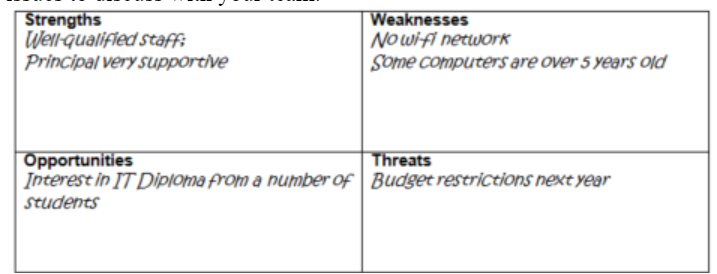
Businesses do this all the time. The acronym ‘SWOT’ stands for Strengths, Weaknesses, Opportunities, Threats, and carrying out this kind of analysis is a good way to start looking at your circumstances in an honest and holistic way.
You can carry it out in a back-of-an-envelope kind of way, on your own, or use it in a team meeting. The advantage of the former is that you can very quickly generate ideas about what needs to be done, or at least what needs to be discussed.
In the illustration below, for example, you could take all of these points and turn them into an agenda of issues to discuss with your team.
SWOT analysis, by Terry Freedman
The advantage of the latter approach as a starting point is that you get everyone else’s ideas too. If you’ve just joined the school as the Education Technology leader, the last thing you want to do really is go in like a bull in a china shop changing everything based on what could turn out to be mistaken assumptions.
This exercise is a good way of getting the lowdown on the situation, or at least your colleagues’ opinion of what the situation is, before devising a plan of action.
Variations on the theme
The whole point of carrying out a SWOT analysis is to get the big picture of the Education Technology provision in your school very quickly. Checklists have their place, because they help to ensure that you cover everything, but this kind of broad brush approach can lead to people identifying issues that they would probably never think of even putting on the checklist in the first place.
But you don't have to use the standard SWOT table as exemplified above. You could, for example, take the approach used to do assessment in many primary schools: three stars and a wish. So, you ask each of your colleagues to come up with three things they think are really good about the Education Technology in your school, and one thing they wish was in place or think needs to be improved.
An alternative is to ask them to suggest three things that are really good, two things which could be improved and one thing they'd really like to have.
Yet another variation, if you don't have a team as such or are feeling fairly brave, is to set up a survey for staff at the school (pupils too if you like, although I believe that interviewing a representative sample of them is better, because it enables you to ask follow-up questions. See the chapter called Ask the Pupils for how to go about this.) There are two problems with asking staff for their opinion:
The first is that it can become a bit depressing if people start throwing all their Education Technology-related problems at you in one fell swoop. However, this is an excellent exercise to carry out if you have only been at the school five minutes, because nobody could reasonably blame you for all that's perceived to be wrong.
Secondly, you would need to handle your request very carefully, not just because everyone is busy, but because it's easy to raise false expectations. Some things simply cannot be changed overnight, but not everyone understands that.
Of course, if few people are using technology in their lessons, or do so only sporadically, you will need to ask your colleagues for their opinions in order to find out why. There are unobtrusive ways of obtaining the information:
Ask one or two trusted colleagues what they think of the Education Technology provision and how it might be improved.
Ask the Principal or another member of the senior leadership team what they think. Having a leadership role should result in their having a view from a whole-school perspective rather than a narrower field of interest.
Getting back to the SWOT analysis carried out only within your team, there are variations in the way you go about it. For example, you might ask each person to carry out a back of the envelope exercise before coming to the next team meeting, so that you can all compare notes in the meeting itself. This saves time in the meeting, but does require you to ask busy colleagues to do yet one more thing.
Once at the meeting you could organise a 'snowball' activity, whereby colleagues go off in pairs and agree the list of strengths etc. Then the pairs get together and agree the list as a foursome. This approach is an effective way of getting to the key issues if you lead a fairly large team (four or more), or if you were doing it as a whole staff exercise.
An alternative approach is to ask one member of the team to come up with a list of three or four strengths, another to focus on the weaknesses, and so on.
Checklist of issues
Here is a checklist of issues that you and your colleagues may wish to consider when carrying out the SWOT analysis. Not all of them are objective, and not all of them are easy or quick to look at. However, use the list to generate ideas for other things to consider. You could even ask different people in your team to focus on just two or three each in their feedback to you.
Is education technology being used a lot by pupils in a wide range of lessons?
Is it being used well, ie in the service of learning, as opposed to being used as a means of keeping pupils occupied?
Is using Education Technology making a difference to pupils’ attainment? This is a difficult one, because how will you find out? The easiest way would be to ask colleagues who are using it well what difference they think it makes, and why. Ask pupils too – and their parents.
What does the Education Technology look like? Let me give you an idea why this is important. There are lots of internet cafés in London, and I almost never go into any of them. Why not? Most of them look seedy, dirty and dingy. They may not be those things, but they look like they are, and I for one have no inclination to find out from personal experience where the truth lies.
Take a look at your technology facilities. Do you have a computer room? If so, does it look like a battle zone? Are the keyboards on your laptops filthy? Are the rooms and other facilities welcoming? For example, is there plenty of guidance available for “newbies”?
Do you have laptops or tablets for loaning out? What do they look like?
An article in the Daily Mail a few years ago reported that computer keyboards have been found to have five times as many bacteria than a toilet seat. Nice.
How many subject leaders are using Education Technology? If the answer is “not many”, it may be that there is a cultural resistance to Education Technology that you will need to address.
How many members of the senior leadership team are using Education Technology? If the answer is “not many” then even if they are very supportive this is something you will need to try to address, because ideally the senior leadership team should lead by example.
What’s going on beyond the school gates, but within the school community? Are the Governors supportive, for example? What are parents’ expectations? Is there a digital divide which needs to be addressed?
Next steps
Once the issues have been teased out through the SWOT analysis, priorities for action will need to be established, followed by courses of action to be carried out by each person, and by when. In other words, the SWOT analysis helps to guide the team's future activity. The nice thing about working that out in this sort of way is that each member of the team will have had a say in the matter.
Planning
When drawing up a plan, you need to make sure the following is included:
Outcomes that are achievable within a reasonable time scale. An oft-used acronym in this area is SMART: Specific, Measurable, Achievable, Relevant, Time-related.
End date, or review dates, or both, for each planned outcome.
Success criteria.
A named person responsible for each planned outcome.
You should follow these rules even if you are the only person in your team. Having specific discrete outcomes, success criteria, review dates, and end dates is crucial in my experience.
For example, a goal lke "improve the education technology provision" is too vague when it comes to planning. You need to decide what would constitute improved provision, and plan accordingly. It might mean having more printers, starting a "digital champions" programme and employing an extra technician. These would all require different timescales and, of course, success criteria.
Remove barriers to entry
Economists use the term "barriers to entry" to refer to obstacles that prevent firms entering a particular market. We can adopt the phrase to mean: what are the obstacles that prevent people in the school using technology?
Is it, for instance, any one or more of these?
Fear
Can't see a need
Work gets lost
Equipment breaks down
Lack of training
The 'kit' is too old
The 'kit' is too new.
It could be any or none of these. You could use a small group of staff to help you determine the answer, perhaps in the form of an Ed Tech Committee. Or you could set up a brief survey.
Once you know what is stopping people from using the technology, you can start to address the issue.
It would also be helpful to decide on what is the criteria of a good degree of usage. For example, one Headteacher I worked for said he wants to see people banging on the doors of the computer room demanding to be let in"
A more useful criterion might be something like in use 50% of the time.
An even better one might be: "Whenever teachers or pupils need to use something they can, and they use it appropriately."
Arrange Visits
Invite a teacher from another school to visit your school, and to try to arrange a visit to another school. Compare notes.
There is no right and wrong about any of this, but the reason that I have deferred this until now is that I think you get more out of visits if you have done a lot of groundwork first, as I explain below.
Purpose of the visits
There are several good reasons to arrange such visits, for example:
To help you see your ed tech provision through the eyes of a disinterested third party (note that I said DISinterested, not UNinterested). People tend to see things they want to see, and to get used to the things that perhaps are not quite right. Someone from outside, with no axe to grind, can ask the awkward questions like, "But why do you do it like THAT?", and to share their own experience with you.
Visiting other schools can give you ideas. When I was involved in Education Technology inspections, on one or two occasions I suggested that the Head of e-Learning visit a few schools to see what was going on 'out there'. Without that injection of fresh ideas, it is really easy to become a bit stale.
If you're thinking of investing in a particular type of network, or software, a visit by and to someone who has already done so can be invaluable in helping you avoid some of their mistakes.
On a longer-term basis, it is often a good idea to forge 'vertical' links, ie with the schools that your pupils are coming from or going on to.
Who should you visit or invite?
If you're in the UK, it's easy to find schools worth a visit in your area. To find out which schools have been accredited with the Naacemark, a badge denoting good edtech provision, go to the Naacemark website.
You could also ask your Local Authority advisor (if there is one).
You might also trawl through the Ofsted reports for schools in which ICT or Computing received a good mention, but as ICT is not always specifically mentioned the reports of good schools in that respect may be a few years old now.
Companies can also recommend schools. For example, an interactive whiteboard company or one that supplies schools with tablet computers will be able to recommend exemplar schools, ie ones which have done great things with that product. In a sense, that narrows the focus somewhat, but in my experience, and from the reading I've done and conversations I've had, doing great things as a whole school in one particular area is usually indicative of a much deeper and broader level of engagement with change management processes and that sort of thing. In other words, it would be highly unlikely, I think, to find a school that was working wonders in its use of interactive whiteboards throughout the school, but which was pretty awful in every other use of education technology.
Also, if you attend conferences or training days, get chatting to people and, if feasible, contact them subsequently to arrange reciprocal visits.
It doesn't have to be another school. It could be a college or even a company. It all depends on what you're mainly hoping to gain from the exercise.
Getting the most out of visits
If you have invited someone to visit your school, I would suggest asking them to walk about and gain a general impression of what's going on. Unless, of course, you'd like their opinion on a particular thing the school has been doing.
When visiting other schools I think you gain much more from it by doing even a small amount of research. What was their last inspection report like (if you're in the UK)? Have they achieved the ICT Mark? What does their website tell you?
For me, part of the research is being done whilst you're attending to your own affairs, which is why I am suggesting visits later rather than sooner. I think it's important to have done some deep thinking first, so that you can ask relevant questions or look for particular aspects at the time: nothing is more frustrating than wishing you'd asked to look at a particular thing when it's too late.
Your task for today
So your task for today is not to visit a school, obviously, as you can't do that in 15 minutes, but to think about what you'd like to get out of a visit to another school, or from someone else visiting your schol. Then have a think about whom to approach.
If you lead a team of teachers, put this topic on the agenda for your next team meeting. Perhaps your colleagues can suggest schools to visit or teachers to invite, and why. If they are nervous about the idea of having visitors, try to explore why. Why is it that they are not 100% confident in what the school is doing in that regard, and what can be done about it?
You can see that even if the discussion results in a decision to not invite others in, that in itself can provide a rich source of data about what needs to be addressed and prioritised as far as education technology in your school is concerned.
Visit an Exhibition
As an education technology leader, one of the most important things you can do is to actively look for new ideas. One great source of ideas is an exhibition.
But, you say, there are no educational exhibitions going on right now. Really? Well maybe there aren’t, but maybe there are – I’ll return to this in a moment. However, it’s not necessarily that relevant anyway. The point of attending an exhibition is not to just be spoon-fed ideas, but to kick-start your imagination.
So, your task for today is to try to identify, and possibly even visit, an interesting exhibition. Where are the best places to look? Here are some suggestions.
If you live in the UK, have a look at the Exhibitions website. This is very comprehensive, and should enable you to plan ahead if you can’t get to an exhibition in the near future.
Museums, especially science museums, can be a great source of inspiration. They often also showcase very interesting applications of technology. Sometimes they house exhibitions of the development of technology over time. Perhaps you could take a look, and if it looks good arrange to take a group of students along. Search for ‘museums and galleries’ online for lists of useful links.
Another source of useful links is the tourist board for your country. Enter ‘tourist board’ into your search engine. For example, the English Tourist Board website lists lots of interesting exhibitions and similar attractions.
Have a look at the website for your local area: there may be an interesting exhibition not a million miles from where you live.
In fact, there may be an exhibition going on in the foyer of the Town Hall, or your local library.
Perhaps a local school has put on an exhibition which you could attend.
Maybe a colleague in your own school has mounted an exhibition you could get to in the next ten minutes.
Even if attending an exhibition does not, in the end, furnish you with any great insights, not to worry. In the words of the old adage: a change is as good as a rest!
Monitor usage
Keeping an eye on what is being used is about what economists call the optimum allocation of resources. If, for example, there is a teacher whose classes use computers or laptops for word processing, and nothing else, they don't need the computer with the latest spec.
Unfortunately, in my experience every teacher thinks they do! It's quite understandable: most people would rather have a bright, shiny, supercharged piece of equipment. Unfortunately, with a limited budget you have to make sure you get the best value you can, not only when it comes to purchasing, but when it comes to usage too.
There is some software available to help you with this.
There is quite a bit of network monitoring software around, including free stuff, but the records they generate can sometimes be complicated, and therefore time-consuming to look at. So what you need is either a really good technical person who can convert all the data generated into high level, readable, data that makes sense to anybody, or you have to resort to asking people and your own observations. With a bit of luck the school’s MIS system will do the monitoring.
Observations can be of the form of what you see people using as you do your “farmer’s footing”, or how frequently different people book different facilities. If you have a booking system for rooms or equipment, you can include a question like “Which applications do you hope to use?”. You can also carry out surveys once a term, say, to find out what people used. You could even have feedback forms available that people can use.
What you might also wish to do is formalise this process and carry out what is, in effect, a fitness for purpose audit.
The key issues you have to decide are:
Where should computers etc go?
What applications should be on them?
How critical is it to have the latest spec and an all-singing all-dancing machine?
Are there particular areas where the computers are not adequate for the task they are required to do?
A summary of all this would be:
Is the right stuff available in the right place at the right time?
If demand for resources, however defined, exceeds supply, then people are going to be unhappy. On the other hand, if supply exceeds demand, then you have been wasting money.
So another way of looking at all this is: can you take some resources from an area where supply exceeds demand, and put them where demand exceeds supply? If you can, then it means you can get more use out of your present resources without spending any more money, or by not spending as much as you might think you need to.
I found that I could buy expensive equipment from companies that knew about education and how schools work, or inexpensive equipment from companies that were little more than box shifters. Not a great set of options!
All of which amounts to the fact that you can have more equipment for people to use, and spend big money on some hardware and software where it really is needed.
Do budget planning and analysis
Is too much money being spent on printing? Are costs in one area significantly greater than in others? What peripherals and consumables need to be bought before the end of this school year, and what needs to be planned for next year?
Involving you team, if you have one, in such discussions can lead to a greater sense of shared responsibility -- as well as some good money-saving ideas.
I have found that a really good way of keeping track of spending is to use a spreadsheet, with a sumif function or equivalent. What this does is to add up items only if they appear in a particular category. It takes very little time to set up, and is incredibly useful.
If you are spending too much in a particular category, you can act on it. For example, ask the Headteacher for a printing budget.
Remember: knowledge is power!
Create a wish list
Let's do a spot of introspection and daydreaming. I've always thought it a good idea to draw up a wish list of stuff you'd like to see in the school as far as education technology hardware and software is concerned.
I think this is an important thing to do for two reasons. One is that I think every good leader has dreams. Maybe your particular vision seems impossible right now, but it's important to dream about it nonetheless. Thinking of what could be has, I think, a subtle aspirational effect, and that rubs off onto others. Another is quite simply that if you suddenly find yourself with a windfall to spend on education technology, or are asked to bid for some funding with very short notice, it's as well to have a sort of shopping list up your sleeve.
And I should say here that, whilst I like to think of myself as both a practical and pragmatic person, there is absolutely nothing wrong with daydreaming. Indeed, I think it is necessary. Where it all goes wrong is where someone has a dream, and does nothing whatsoever to bring it to reality. Dreaming is necessary, as I said; it is not sufficient.
Without a vision, how could you even start to draw up a wish list? A wish list should not be a ragbag of random items thrown together, but should reflect what you'd like learning and teaching with technology in your school to look like. That's the starting point: not "How many pocket camcorders would I like?", but "How can we help youngsters express themselves without having to speak it or write it?".
It would be great if those headteachers who say "We must give an iPad to everyone" took that approach!
I suggest the following 'rules' for drawing up a wish list:
Base it on a vision for learning and teaching, as already mentioned.
Discuss it with colleagues and students. Perhaps your wish list could start as the 'seed funding' for an ideas bank. Why not set up a wiki for this?
Organise it into price bands. The reason for this is that I think it's good to have an instant answer to each of these questions, and all the ones in between: "How would you spend £100 if I gave it you now?"; "How would you spend £5m if I gave it to you now?" Sometimes you may find yourself in a situation in which you have to come up with an answer very quickly (in one case for me it was instantly) in order to acquire the money. Therefore it's a good idea to adopt the Boy Scouts' motto, Be Prepared.
Keep reading magazines, educational news, and blogs. You need to keep abreast of what's 'out there' in order to be able to include it in a wish list. I'll cover this in more detail at a later date. But it's another reason to make sure others may contribute to your wish list, since they may know things that you don't.
Above all, keep your wish list up-to-date. Is a new inkjet printer really the pinacle of your aspirations?
Find a Non-Specialist Geek
Economists have a concept called 'Comparative Advantage', which runs like this. Suppose I'm really good at painting, but lousy at plastering, and you're a wizard at plastering but don't know one end of a paintbrush from the other. It doesn't take too much mental effort to work out that you and I should come to an arrangement: I'll do your painting if you do my plastering.
So far, so obvious. But here's the surprise: it turns out that even if I'm better than you at both painting and plastering it could still be worthwhile us coming to exactly the same sort of arrangement. It all depends on one thing: are you relatively, ie comparatively, better at one of the skills than I am, and vice-versa? If so, it makes sense for each of us to focus on our strengths.
So what does all this have to do with being an ed tech leader? Quite simply that even if you're the acknowledged Education Technology expert in the school, there may still be colleagues who could teach some aspects of Education Technology much better than you can for the same amount of effort.
For example, I know a Teaching Assistant who is an artist and poet, and a visual thinker. The consequence of this is that he will often think about using animation, video, or photo story-telling techniques to get the point across. If I worked in the same school as him, it would make perfect sense to try and arrange for him to work in the ed tech lessons teaching the kids all about using those approaches. Even if that were not feasible, at the very least I would try and cajole him into running a training session for staff, or even only my team, so that we could start using those techniques effectively too. I could do all this myself, but even if I know more about all this than he does (which I'm sure is not the case anyway), in the time it takes me to prepare one animation lesson and all the resources I need, I could have prepared two or three lessons centred on spreadsheets. Using this fellow would be a much better use of resources.
When I was Head of Education Technology, there was a science teacher in the school who had really in-depth knowledge of a database I'd just purchased. I knew it well too, but I asked her if she'd be good enough to run a training session for my team and me. It seemed to me that, having used it for longer than I had, and having used it with students in the classroom, she'd be much better than me at pointing out pitfalls, workarounds, extra resources and so on. I was right.
So this is what I mean by 'non-specialist geek': someone who isn't a specialist in education technology as such, but has an in-depth knowledge of one particular field that has a place in the Education Technology curriculum.
There are lots of examples once you start looking and listening. They may even be in your own team. Perhaps one of them has been delving into their family history, which makes them a geek of sorts on research and databases. Maybe one of them works as a DJ at weekends, in which case they know about compiling playlists and mixing sounds.
Who do you know in your team, or in the school as a whole, who has expertise in one particular niche of education technology? Who has such a passion for it that they can make it come alive in a way that you cannot?
Once you've identified such people, it probably won't take too much effort persuading them to talk about something they're passionate about, but you have to think of practical issues, like:
Are they able to help out in your lessons, ie does the timetable permit it?
If they do help out, can you negotiate a quid pro quo with whoever arranges cover for absent staff, eg that they're not called on to cover for those lessons?
If they give up an hour after school to run some training for your team, what can you offer in return? Training their team in some other aspect of education technology perhaps?
Even if you don't have a team, such a person could still be incredibly useful. She or he could help you become more familiar with a particular technology, for instance. Or maybe they would run a training session or a surgery once in a while for the whole staff.
Whatever arrangement you come to, even if they don't actually want anything in return, I think it's important to send an email to their own team leader or the head teacher saying what a great help they've been, and thanking him or her for allowing it to go ahead. Thanking someone is both good manners and costless, and by doing it in writing you ensure that the fact that they helped out isn't lost in the fullness of time.
Engage parents
When you have a parents evening or an open day, have something exciting for people to look at, such as a video of Education Technology in use around the school, or a rolling PowerPoint presentation. Have student helpers on hand to show parents how to use the software. Set up a facility whereby parents can print out a certificate saying they completed a task on the computer. Give your student helpers special badges: it is amazing how proud it makes them feel! You can print off some really nice badges using either printing labels and a wordprocessor or, even better, a badge-maker in conjunction with Flickr.
In my experience, the first step in getting parents engaged is to make sure they are informed. The next stage is to get them interested and even excited.
To keep them informed, you have several options:
A slot in the newsletter that is sent out to parents, saying how pupils are using the equipment. I think you need to be a bit careful because unfortunately putting in a news item like “So excited to have taken delivery of 300 iPads” is almost an open invitation to be burgled.
A more subtle approach is to post videos of the children working on an area of the school’s website that parents can access. Obviously you will need parental permission for this. It’s good for parents to actually see what their kids are doing with their tablets etc.
Another option is to get the pupils blogging.
Hold special “briefing” evenings for parents
Run in-school classes for parents on subjects like “How to keep your child safe online” or “How to help your child learn to write computer programs”
When you send reports to parents, include some context. I always used to insert a standard paragraph at the top of each report that said something like “This term, pupils were taught how to write simple programs. They were then asked to solve problem X.”
Create a Buzz
Oscar Wilde was right. He said:
There’s only one thing worse than being talked about, and that’s not being talked about.
But when it comes to using education technology in a school, I’d say you have go further than getting people to talk about it. You have to go even further than getting people to use it. You have to get people excited about it. That is not necessarily an easy thing to do. You and I may be technophiles, but for many people the prospect of using technology is an unwelcome one, even a terrifying one. Even if you can lure them into your world through having nice facilities just for them, and by having excellent assistance on hand, you may still be in the position, perhaps for historical reasons, of always struggling against a general resistance and reluctance to using technology.
The idea of creating a buzz is to make the idea of using education technology exciting, perhaps even fun – not a word you tend to see in books and papers about the benefits of using Education Technology, unfortunately, although Stephen Heppell has tried to change that through his idea of "Playful Learning". However, it also has to be perceived as serious too, or students may not choose it in their options, and the Headteacher and others may not be willing to support it very much, financially or otherwise. This shouldn’t be difficult: why should “serious” and “fun” be mutually exclusive?
But the list below may surprise you. For me, creating a buzz is just as much a long-term commitment as a short-term flash: it’s not all about generating a flurry of excitement for a day or two.
And what does creating a buzz have to do with Education Technology leadership? Everything. I don’t care how great an Education Technology leader someone thinks they are: if the ed tech facilities are languishing in a state of disuse, and people are studying it or using it under sufferance, they haven’t quite got there yet. I’ll be looking at the indications of a good Education Technology leader in Idea 30 of this series.
Now, with no further ado, here are my top 10 tips for creating a buzz about Education Technology.
Make it interesting
If Education Technology is a taught subject, make sure it’s interesting. A good starting point is the syllabus: the topics covered should be interesting. Where they don’t seem to be intrinsically interesting, you have to make them so. That means using great resources, and teaching it in a non-boring way. A good starting point, if I do say myself, is my seminal work “Go On, Bore 'Em!: How to make Education Technology lessons excruciatingly dull”. You’ll find the details about this inexpensive but essential volume in the ebooks section of the ICT in Education website.
Make it worthwhile
I have been in a couple of schools in which the powers-that-be have allowed a situation to develop in which Education Technology is regarded as an easy alternative to “proper” ones like English or Science. Students are entered for purely skills-based courses because they are perceived as easier than the more academic ones. This sort of trend must be resisted. If you’re in a school which prides itself on the fact that by the end of the first year all pupils have gained a portfolio of skills qualifications in Education Technology, by all means carry on that tradition. But make sure it’s taken seriously as an academic subject as well.
(This, I think, is where the advocates of Education Technology being taught and used purely across the curriculum, and not in its own right, are wrong. There are concepts to be learnt, and applied more generally. There are ways of thinking about problems, and how to solve them, from an Education Technology perspective. I’m not sure you get that across very easily where the subject is taught only from an individual curriculum subject’s perspective, and only as a set of skills.)
In one school I worked at, I insisted that every student worked towards a GCSE in Education Technology, because what had happened was that a vicious circle had materialised. Easy courses were offered in order to attract all kinds of students, including the academically less able. However, that had led to a situation in which the brighter students no longer chose it in their options because they perceived it as being not a worthwhile use of their time: why would they spend the same amount of time going to Education Technology lessons as going to another subject’s lessons when the end result was a qualification which had little or no currency?
Having every student take a GCSE course didn’t preclude allowing them to take other qualifications along the way, and so didn’t disadvantage the less able. Indeed, many of the so-called less able students themselves gained a GCSE in the subject. It was yet another example of students rising to the level of their teacher’s expectations.
Make it an area of expertise
Many people, myself included, are self-taught when it comes to using technology. So, you and your colleagues may not have letters after your names, but you can still become experts by going on courses and having other professional development experience, and even taking qualifications along with your students. Having a team of experts is important too.
Use positive language
I think it’s tremendously powerful to use the word “when” rather than “if”. I used to say, “When you come to do your GCSE in Education Technology, you’ll find this concept quite useful.” I felt very gratified once when I heard two girls chatting about what else they were going to take besides ICT in their options – two years hence!
Keep the profile up
Some ways of keeping colleagues and students aware of Education Technology without being completely in their faces the whole time include:
Having a dedicated area of the staffroom noticeboard for announcements, computer room timetables, equipment booking information and so on. Call it something like “Education Technology Corner” (it’s best to have an actual corner of the noticeboard for this to work!) By all means have all this electronically, but if many or even just some teachers won’t look at the electronic version then you need something else too.
Publish a termly or half-termly newsletter to let people know what new software and equipment is now available, what skills the students should have by now, what’s going to be covered after the break, handy hints, software shortcuts – you know the sort of thing. It doesn’t have to be long: a double-sided sheet is plenty. You might even consider getting students to play a large part in its production.
As above, but in the form of a weekly blog, podcast or video. These are not mutually exclusive in themselves, but practically speaking it may be hard to find the time to do all of them yourself. If you’re able to get colleagues and pupils involved, not only will that make it all more feasible, but it will in itself help to create a buzz.
Make it lively
An extension of this is displays – not only in the classrooms themselves but outside them. If you have an Education Technology area, make it an exciting, vibrant place to walk into. Fading, curling posters from British Telecom circa 1980 are unlikely to meet this requirement! Include examples of pupils’ work (copies, not originals), copies of interesting newspaper headlines (it’s only a matter of time before someone else leaves a laptop containing everyone’s bank account details on the back seat of a car in full view), careers information (if appropriate in your context), photos (eg of student helpers – see above) and local press cuttings and so on.
Create a geek squad
Having pupil experts – one or two in each class – can not only provide a much-appreciated level of classroom support (eg by putting paper in the printer or going to get a technician), but helps to generate buzz amongst students. See "Ask the pupils", and see the next point too.
Put on a show
When you have a parents evening or an open day, have something exciting for people to look at, such as a video of Education Technology in use around the school, or a rolling PowerPoint presentation. Have student helpers on hand to show parents how to use the software. Set up a facility whereby parents can print out a certificate saying they completed a task on the computer. Give your student helpers special badges: it is amazing how proud it makes them feel! You can print off some really nice badges using either printing labels and a wordprocessor or, even better, a badge-maker in conjunction with Flickr.
Invite a special guest
As well as or instead of inviting guest speakers to your team meetings, which may not always be feasible, invite a special guest along to show them what the school is doing with Education Technology, and to get their feedback. Headteachers tend to love this, and rightly so, because it puts the school in a really good light. Everyone likes to celebrate success.
Get a story in the local media
This can be useful too, but there are two things to be aware of. Firstly, check your school’s policy on this sort of thing. The last thing anyone wants is for staff to be contacting reporters on an ad hoc basis. There is probably a well-oiled machine in place to achieve local publicity. If there isn’t, discuss the idea with your boss first. Secondly, it’s probably not a sensible idea to advertise the fact that the school has just purchased 2,000 iPads! Stories should focus on pupils or events. For example, I once generated quite a bit of publicity in the local press by informing them that I’d had 15 year-old students taking classes of 11 year-olds to teach them about some aspect of Education Technology, as part of their work experience (don’t worry: the 11 year-olds’ usual teacher was present the whole time).
Conclusion?
I'm pretty sure I haven't covered every possible way of generating buzz about Education Technology, but hopefully this is a start!
I originally published this in 2009. Unfortunately, it’s still very much relevant. There are a few relatively minor changes.
I offer this rant partly to get things off my chest -- I think I now officially qualify for the title "grumpy old man", even though I don't much care for the "old" part -- but even more so as a topic which teachers may like to raise with their students. The basic question is, I think, is technology being used inappropriately, or intrusively or even, ultimately, ridiculously?
I visited my local supermarket yesterday and decided to use the self-service check-out. This is a very advanced service which seems to require there to be at least two members of staff on hand at all times in order to sort out the problems it comes up with. If I tell you that I, of all people, have developed what amounts to a phobia about using it you may get a sense of how awful I think it is most of the time.
It isn't that the problems which arise are terrible in themselves, just that it's so embarrassing when a line of people is building up behind you. And that's another thing: it works perfectly when nobody else is around....
Just to put the positive side to the equation, I will admit to having found it much faster, sometimes, than the normal check-out, and it is undoubtedly more fun. There is a video game-type display showing you what to do, and a voice which guides you though the process. That voice is female and was chosen, I am certain, to sooth the nerves of people such as myself and thereby prevent acts of vandalism directed towards the machinery.
But yesterday even I was floored by a message that appeared on the screen.
Before going any further, I have to inform non-UK residents that we in England have reached the point where anyone who sells anything is scared to death of being sued. Thus it is that if you buy a drink from a fast food outlet you'll see a notice on the cup informing you that the contents may be hot -- even if you've purchased an iced tea. On foodstuffs, just about everything contains the warning, "May contain nuts". Bizarrely, bags of nuts do not come with such a warning. I must contact my attorney....
Even food which could not possibly contain anything even resembling a nut comes with the caution that it may contain traces of nuts, or that it was processed on machinery that may once have been used to process nuts.
Medicine packets list every single possible side effect of the contents therein. So, if three years ago someone took one of these tablets and then two weeks later his left leg dropped off, one of the possible side effects listed will be "May cause leg to drop off."
Back to the supermarket. The way it works is that you scan the item, then drop it into a plastic bag. The item shows up on the screen, then you're ready to put the next one on. One of the items last night was a box of painkillers. I scanned it, dropped it in the bag, and then had a warning message appear reading something like: "You have bought painkillers. You cannot buy any more unless you are authorised to do so. Are you authorised to do so? Yes/No"
Authorised? By whom? My mother? The store manager? I pressed "Yes" and it let me continue. In discussion with my wife we decided that it must be the store's way of protecting itself against prosecution by the families of people who decide to end it all by taking an overdose of painkillers. Presumably such people are too depressed to think about buying one huge box, buying several small boxes in several shops, or just to press "Yes". Perhaps there is some law that states that nobody is allowed to sell anyone more than one box of painkillers at a time.
Perhaps this idea could be extended to other areas of modern life? How about this: when you press the button on a traffic light, suppose a message came up: "Crossing the road is dangerous. Have you been authorised to do so?"
Homes could be fitted with such a system, so that as you go out of the house you're warned that "There are muggers and drunk drivers out there. Don't do it!" And when you put your key in the door to come in: "You do realise, I hope, that most accidents happen in the home? Do yourself a favour and head to the nearest hotel. Here's a list of the nearest ones which have vacancies..."
And by the way, I do hope you've printed this out to read. Computers use electricity, and electricity is dangerous. Make sure you've been authorised.
information board, by Terry Freedman. This sort of summarises what I consider to be the usefulness of PISA, when you get right down to it.
I used AI to trawl through the latest PISA stats. These pertained to 2025 and were published in September 2026. One AI seemed to believe the most recent results were from 2022. Weird. With AI, it really is a matter of caveat emptor! OK, let’s get into it.
The results
ChatGPT Prompt: summarise latest PISA results (2025) in the fields of English, maths and computing.
Yes. One important clarification first: the PISA 2025 results were actually published on 8 September 2026, so they are now the latest PISA results. PISA tests 15-year-olds. Also, PISA does not have a subject called “English”: it tests reading. Computing is represented by a new computational problem-solving assessment. (OECD)
PISA 2025 — the headline picture
Reading / “English”
OECD reading fell dramatically: −14 points since 2022 and −28 since 2015.
The UK was much more resilient: 494, essentially unchanged from 2022.
80% of UK pupils reached Level 2 or above, compared with 69% across the OECD.
9% of UK pupils were high performers (Level 5+), against 6% OECD.
Particularly worrying internationally is deterioration in evaluating information, connecting information across sources and critical reading—skills especially relevant in the age of AI.
Mathematics
OECD average: 463, down 9 points since 2022 and 22 points since 2015.
UK: 488, down just 1 point since 2022, a statistically insignificant change.
74% of UK pupils reached Level 2+, compared with 65% OECD.
13% of UK pupils were Level 5/6 high performers, versus 8% OECD.
The UK nevertheless has a sizeable gender gap: boys outperformed girls by 24 points, compared with an OECD average gap of 13.
Computing This is the really interesting new bit for an ICT/Computing perspective. PISA 2025 introduced computational problem solving rather than simply testing computer knowledge or programming in isolation. It examines how pupils use computational tools and practices to model problems, experiment, program and create digital products.
OECD average: 500
UK: 523
UK therefore performs significantly above the OECD average.
The highest scores were Macao 572, Singapore 563, B-S-J-Z China 560 and Japan 557.
The UK was roughly alongside Canada and ahead of countries such as Switzerland, Czechia and Ireland.
An interesting finding is that computational problem-solving correlates strongly with maths (0.75) and science (0.76), but it isn’t simply another version of those subjects: PISA says it measures a distinct set of skills.
The really significant story
For England/UK education, I’d reduce the results to three messages:
1. The UK is doing considerably better than the OECD average. The UK is one of the systems in the top ten in all three core PISA subjects: science, mathematics and reading.
2. The international deterioration in reading and maths is much more alarming than the UK figures initially suggest. The OECD has reached its lowest-ever average performance in reading and mathematics. The UK has largely avoided the dramatic falls seen elsewhere, particularly in reading.
3. “Computing” is no longer just about knowing how to code. The new PISA assessment is arguably more interesting educationally: it asks whether students can use computational thinking, tools, experimentation, modelling and programming to solve unfamiliar problems and create things. That’s potentially a much better fit with where school Computing is heading.
One other striking PISA finding for anyone working in EdTech: moderate educational use of digital devices is associated with better outcomes, whereas excessive use and digital distraction are associated with worse outcomes. 28% of OECD pupils said classmates were distracted by devices during most or every science lesson. AI use also produced a complicated picture rather than the simple “AI = better learning” story.
PISA misgivings
I made a note of what was wrong with the PISA comparisons in my opinion, and then asked At what the objections to it were. (I’m relieved to report that it came up with the same list!)
Perplexity prompt: What are the misgivings about PISA as a means of measuring and comparing education achievement?
There are deep and well-documented misgivings about using PISA (the Programme for International Student Assessment) as the primary means of measuring and comparing educational achievement across countries. Critics argue that its design, assumptions, and the way its results are used make it a poor basis for judging school systems or driving policy.
Core conceptual criticisms
Narrow definition of “achievement”: PISA focuses on reading, mathematics and science literacy at age 15, but ignores many valued outcomes of education such as creativity, citizenship, arts, ethics, social skills, and subject-specific knowledge in history, geography, languages, etc
Unproven claim about “skills for the future”: PISA presents itself as measuring competencies needed for modern life and economies, but scholars note there is little empirical evidence that its items validly capture these broader life skills, or that they are universally applicable across very different societies.
Western-centric, monolithic view: The test assumes a single set of skills and knowledge is desirable everywhere, which critics say imposes a largely Western, OECD-style vision of education on diverse cultures and systems.
Methodological and statistical concerns
Cross-sectional, not longitudinal: Each PISA cycle tests a different sample of 15-year-olds; it does not follow cohorts over time. That limits what can be inferred about the impact of specific policies or reforms, because you’re not seeing the same students’ progress.
Measurement error and unstable rankings: Country rankings often hinge on small differences that sit within the tests’ error margins. When error terms and confidence intervals are properly considered, many “gains” or “drops” in league tables are not statistically meaningful.
Sampling and representativeness issues: In some high-profile cases (e.g., Shanghai), results have been based on subsets of students that are not representative of the whole population, yet those results are used to hold up entire systems as models.
Context ignored: PISA does not adequately adjust for differences in family academic resources, socio-economic context, enrolment rates, or the proportion of students actually in school at age 15, all of which strongly influence average scores.
Curriculum and policy distortions
Curriculum narrowing: Because PISA rankings carry high political stakes, systems often narrow the curriculum toward tested areas, marginalising arts, humanities, and other subjects not measured by PISA.
Teaching to the test and “PISA industry”: The pressure to climb the rankings encourages test-focused teaching, short-term policy fixes, and a market in PISA-aligned materials and consultancy, rather than deep, sustainable educational improvement.
Misuse for causal claims: Politicians and commentators frequently treat correlations between PISA scores and economic outcomes as if they were causal, despite the well-known “correlation is not causation” problem and flawed temporal logic in some influential reports.
Governance and conflict-of-interest worries
OECD as tester and policy interpreter: The OECD both administers the test and interprets the results for policy purposes, creating a potential conflict of interest and reinforcing a particular policy narrative (often aligned with market-oriented reforms).
Neoliberal policy driver: Critics argue PISA’s ideology promotes competition, standardisation, and accountability regimes that fit a neoliberal agenda rather than a broader educational vision.
Practical comparability problems
Different systems, different aims: Educational systems value different things (e.g., vocational pathways, local languages, civic education). PISA’s single metric cannot capture these differing goals, yet its league tables imply a universal hierarchy.
Within-country variation larger than between-country differences: In large, diverse countries (e.g., the US), differences between states or regions can be bigger than differences between nations, making national averages misleading for policy.
Leaving aside issues of copyright and related matters, two things strike me about this question. Firstly, if students can cheat by using AI to complete their assignments. does that not imply that the assignments were not fit for purpose in the first place (assuming the purpose was to assess students’ knowledge and understanding of the particular topic?) The challenge, surely, is to devise assignments that require more than answers based on probability.
For example, one thing that Al is pretty good at, notwithstanding its hallucinations, is searching the web and even documents on the web in some circumstances. So getting students to do the research in order to do something with the results, rather than getting AI to do the grunt work, seems to me like some teachers I’ve observed getting their students to enter data into a spreadsheet in order to carry out calculations and predictions. What tends to happen is that by the end of the lesson some students have not even finished entering the data. It’s a complete waste of everybody’s time. Much better to furnish students with a populated spreadsheet so that they can focus on what sort of formulae to insert in order to complete the task.
By analogy, I think getting AI to do the heavy lifting in terms of research makes sense. Yes, they will have to spend a bit a time evaluating AI’s results, but in my opinion it would still be a better use of time.
Or perhaps, as a compromise, they could carry out the research in the old way (!), or write down what they think might be the points that come up, and then use AI as a check. That’s what I did with my piece on objections to PISA (see below). I made a note of what was wrong with it in my opinion, and then asked At what the objections to it were. (I’m relieved to report that it came up with the same list!)
The other thing that strikes me about the question of whether it matters if students use AI is that it is similar to a question I liked to put to ed tech coordinators when Microsoft introduced wizards, My question was: if a student uses a wizard to, say, produce a leaflet, rather than create it themselves, does that suggest that they have a high level a digital literacy or a low level? It always led to a lively debate, but my own view was that getting a wizard to get something in place that you could then amend and adjust was a much better use of time than painstakingly creating it from scratch.
We all know that things tend to be cheaper per unit the more you buy. If you are the edtech co-ordinator for your school. undertake an audit of the software in use-which you should do anyway to check you have enough licences — and who bought it. You may discover, as I did when I took on the role of head of computing, that two departments had, unknown to each other, bought the same software. They had paid for 30 licences, but by renewing the licences centrally I was able to purchase 60 licences for less than double the cost of 30, so both the school and each of these departments saved some money.